Node Types
Every step in a workflow agent is a node. There are 10 types, each doing one job, wired together by edges on the canvas. Drag them from the palette in the builder; this page is the reference for what each one needs and what it hands downstream.
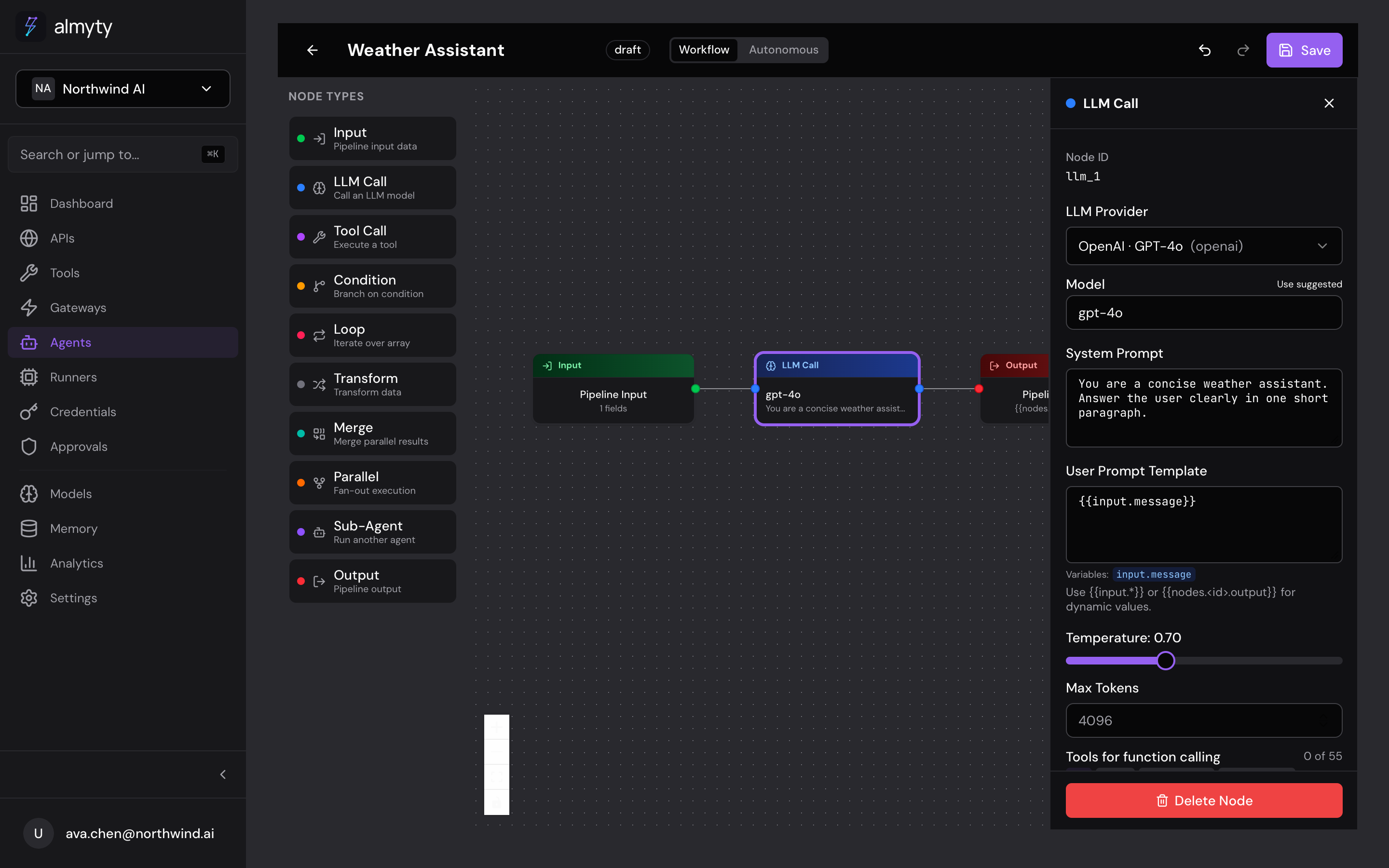
Quick Reference
| Node Type | Required Fields | Output available as |
|---|---|---|
| Input | schema | {{input.*}} |
| Output | mapping | (terminal node) |
| LLM Call | providerId, userPromptTemplate | {{nodes.<id>.output}} |
| Tool Call | toolId | {{nodes.<id>.output}} |
| Condition | expression | (routes to true/false branches) |
| Transform | code | {{nodes.<id>.output}} |
| Loop | iterableExpression | {{nodes.<id>.output}} |
| Parallel | branches | {{nodes.<id>.output}} |
| Merge | sources, strategy | {{nodes.<id>.output}} |
| Sub-Agent | agentId | {{nodes.<id>.output}} |
Input
The entry point of every pipeline. Defines the JSON Schema that incoming data must conform to.
In the UI
- Click the Input node on the canvas
- In the config panel, define properties and their types
- Mark required fields
- The schema is validated against invocation payloads at runtime
Configuration
| Property | Type | Description |
|---|---|---|
schema | JSON Schema | Shape of accepted input |
{
  "id": "input_1",
  "type": "input",
  "data": {
    "schema": {
      "type": "object",
      "properties": {
        "message": { "type": "string" },
        "context": { "type": "string" }
      },
      "required": ["message"]
    }
  }
}
Every pipeline must have exactly one Input node. Access its data in template
expressions via {{input.message}} or {{input.context}}.
Output
The exit point of the pipeline. Maps the final result from upstream nodes.
In the UI
- Click the Output node on the canvas
- In the config panel, set the Mapping expression to reference an upstream node’s output
Configuration
| Property | Type | Description |
|---|---|---|
mapping | Template string | Expression resolving to the output value |
{
  "id": "output_1",
  "type": "output",
  "data": {
    "mapping": "{{nodes.llm_1.output}}"
  }
}
Every pipeline must have exactly one Output node.
LLM Call
Sends a prompt to a configured LLM provider and returns the response.
In the UI
- Drag an LLM Call node onto the canvas and connect it
- In the config panel, select a Provider and Model from the dropdowns
- Write a System Prompt and User Prompt Template (supports
{{...}}expressions) - Optionally attach tools for function calling and adjust temperature/token limits
Configuration
| Property | Type | Default | Description |
|---|---|---|---|
providerId | string | — | ID of the LLM provider to use |
model | string | Provider default | Specific model (e.g., gpt-4o, claude-sonnet-4-20250514) |
systemPrompt | string | — | System prompt for the LLM |
userPromptTemplate | string | — | User prompt with template expressions |
temperature | number | 0.7 | Sampling temperature (0-2) |
maxTokens | number | 1024 | Maximum tokens in the response |
toolIds | string[] | [] | Tool IDs available for function calling |
{
  "id": "llm_1",
  "type": "llm_call",
  "data": {
    "providerId": "provider-uuid",
    "model": "gpt-4o",
    "systemPrompt": "You are a helpful assistant.",
    "userPromptTemplate": "Answer this: {{input.message}}",
    "temperature": 0.5,
    "maxTokens": 2048,
    "toolIds": ["tool-1", "tool-2"]
  }
}
When toolIds are provided, the LLM can invoke those tools during execution.
Tool call results are fed back to the LLM automatically.
Tool Call
Directly invokes a tool with explicit parameter mapping, without involving an LLM.
In the UI
- Drag a Tool Call node onto the canvas
- In the config panel, select a tool from the dropdown
- Map each parameter using template expressions or static values
Configuration
| Property | Type | Description |
|---|---|---|
toolId | string | ID of the tool to execute |
parameterMapping | array | Maps template expressions to tool parameters |
{
  "id": "tool_1",
  "type": "tool_call",
  "data": {
    "toolId": "tool-uuid",
    "parameterMapping": [
      { "key": "query", "value": "{{input.message}}" },
      { "key": "limit", "value": "10" }
    ]
  }
}
The result is available downstream as {{nodes.tool_1.output}}.
Condition
Branches the pipeline based on a boolean expression. The node has two outgoing
edges: one for true and one for false.
In the UI
- Drag a Condition node onto the canvas
- In the config panel, write a JavaScript expression that evaluates to true or false
- Connect the true handle to one branch and the false handle to another
Configuration
| Property | Type | Description |
|---|---|---|
expression | string | JavaScript expression evaluating to true/false |
{
  "id": "cond_1",
  "type": "condition",
  "data": {
    "expression": "{{nodes.llm_1.output}}.includes('error')"
  }
}
Transform
Applies a JavaScript transformation to data flowing through the pipeline. Transform nodes run in a sandboxed environment.
In the UI
- Drag a Transform node onto the canvas
- In the config panel, write JavaScript code in the code editor
- Use
{{...}}expressions to reference upstream data - The code must return a value
Configuration
| Property | Type | Description |
|---|---|---|
code | string | JavaScript code that processes input and returns output |
{
  "id": "transform_1",
  "type": "transform",
  "data": {
    "code": "const data = {{nodes.tool_1.output}};\nreturn data.map(item => item.name).join(', ');"
  }
}
Loop
Iterates over an array, executing downstream nodes for each item.
In the UI
- Drag a Loop node onto the canvas
- In the config panel, set the Iterable Expression to an array reference
- Optionally set a Max Iterations safety limit
- Connect downstream nodes that should run per iteration
Configuration
| Property | Type | Description |
|---|---|---|
iterableExpression | string | Template expression resolving to an array |
maxIterations | number | Safety limit for iteration count (default: 100) |
{
  "id": "loop_1",
  "type": "loop",
  "data": {
    "iterableExpression": "{{nodes.tool_1.output.items}}",
    "maxIterations": 50
  }
}
Inside the loop body, access the current item as {{loop.item}} and the
index as {{loop.index}}.
Parallel
Executes multiple downstream branches simultaneously and aggregates results.
In the UI
- Drag a Parallel node onto the canvas
- In the config panel, select which downstream nodes to run concurrently
- Choose an Aggregation strategy:
array,object, orfirst
Configuration
| Property | Type | Description |
|---|---|---|
branches | string[] | IDs of downstream nodes to run in parallel |
aggregation | string | How to combine results: array, object, or first |
{
  "id": "parallel_1",
  "type": "parallel",
  "data": {
    "branches": ["llm_1", "llm_2", "tool_1"],
    "aggregation": "array"
  }
}
Results are available as {{nodes.parallel_1.output}}, which is an array or
object depending on the aggregation strategy.
Merge
Combines outputs from multiple upstream nodes into a single value. Use this after parallel branches or condition branches to unify data before continuing.
In the UI
- Drag a Merge node onto the canvas
- Connect the branches you want to combine as inputs
- In the config panel, select a Strategy for combining the values
Configuration
| Property | Type | Description |
|---|---|---|
sources | string[] | IDs of upstream nodes whose outputs to merge |
strategy | string | Merge strategy: concat, object, or first_non_null |
{
  "id": "merge_1",
  "type": "merge",
  "data": {
    "sources": ["llm_1", "llm_2"],
    "strategy": "object"
  }
}
The merged result is available as {{nodes.merge_1.output}}.
Sub-Agent
Invokes another agent as a step within this pipeline, enabling composable and modular architectures.
In the UI
- Drag a Sub-Agent node onto the canvas
- In the config panel, select the target agent from the dropdown
- Map input fields from upstream node outputs to the sub-agent’s expected input schema
Configuration
| Property | Type | Description |
|---|---|---|
agentId | string | ID of the agent to invoke |
inputMapping | array | Maps expressions to the sub-agent’s input schema |
{
  "id": "sub_1",
  "type": "sub_agent",
  "data": {
    "agentId": "agent-uuid",
    "inputMapping": [
      { "key": "query", "value": "{{nodes.llm_1.output}}" }
    ]
  }
}
The sub-agent’s output is available as {{nodes.sub_1.output}}.