Authentication
This is the HTTP API reference. For UI walkthroughs, see Getting Started and the feature guides above.
The almyty API uses JWT (JSON Web Tokens) for authentication. The web UI
receives its token as an httpOnly SameSite=lax cookie so JavaScript
running in the page can’t read it, cross-site scripting and compromised
npm packages can’t steal the session. Programmatic clients and CLIs use
a Bearer Authorization header with an API key they can mint from
Settings → API Keys (or via the CLI login flow).
Every token carries iss: "almyty" + aud: "almyty-api" claims and is
signed with HS256. Both claims are enforced on verification, tokens
issued by another service that happens to share the signing secret are
refused with “jwt issuer invalid”.
Rate limits on auth endpoints
Brute-force, enumeration, and credential-stuffing surface is gated at the route level, on top of the global 100 req/60s throttle:
| Endpoint | Limit |
|---|---|
POST /auth/register | 10 per hour per IP |
POST /auth/login | 10 per 5 minutes per IP |
POST /auth/forgot-password | 5 per hour per IP |
POST /auth/refresh | 20 per 5 minutes per IP |
GET /auth/check-organization-name | 30 per minute per IP |
POST /:org/:gw/register (OAuth dynamic client registration) | 10 per 5 minutes per IP |
Registration
Create a new account:
curl -X POST https://api.almyty.com/auth/register \
  -H "Content-Type: application/json" \
  -d '{
    "email": "user@example.com",
    "password": "SecurePass123!",
    "firstName": "Jane",
    "lastName": "Doe",
    "organizationName": "Acme Corp"
  }'
Parameters
| Parameter | Type | Required | Description |
|---|---|---|---|
email | string | Yes | Valid email address |
password | string | Yes | Minimum 8 characters, must include uppercase, lowercase, and number |
firstName | string | Yes | User’s first name |
lastName | string | Yes | User’s last name |
organizationName | string | Yes | Name for the default organization |
Response
{
  "success": true,
  "data": {
    "token": "eyJhbGciOiJIUzI1NiIs...",
    "user": {
      "id": "user-uuid",
      "email": "user@example.com",
      "firstName": "Jane",
      "lastName": "Doe"
    },
    "organization": {
      "id": "org-uuid",
      "name": "Acme Corp"
    }
  }
}
Login
Authenticate with existing credentials:
curl -X POST https://api.almyty.com/auth/login \
  -H "Content-Type: application/json" \
  -d '{
    "email": "user@example.com",
    "password": "SecurePass123!"
  }'
Response
{
  "success": true,
  "data": {
    "token": "eyJhbGciOiJIUzI1NiIs...",
    "user": {
      "id": "user-uuid",
      "email": "user@example.com",
      "firstName": "Jane",
      "lastName": "Doe"
    }
  }
}
Using the Token
Include the JWT in the Authorization header of all API requests:
curl https://api.almyty.com/apis \
  -H "Authorization: Bearer eyJhbGciOiJIUzI1NiIs..."
Token Expiration
JWT tokens expire after 24 hours. For long-lived programmatic access, use API keys instead.
API Keys
API keys are long-lived tokens for scripts, CI pipelines, and CLI tools. They don’t expire (unless revoked) and carry the same permissions as your user account.
Getting an API key
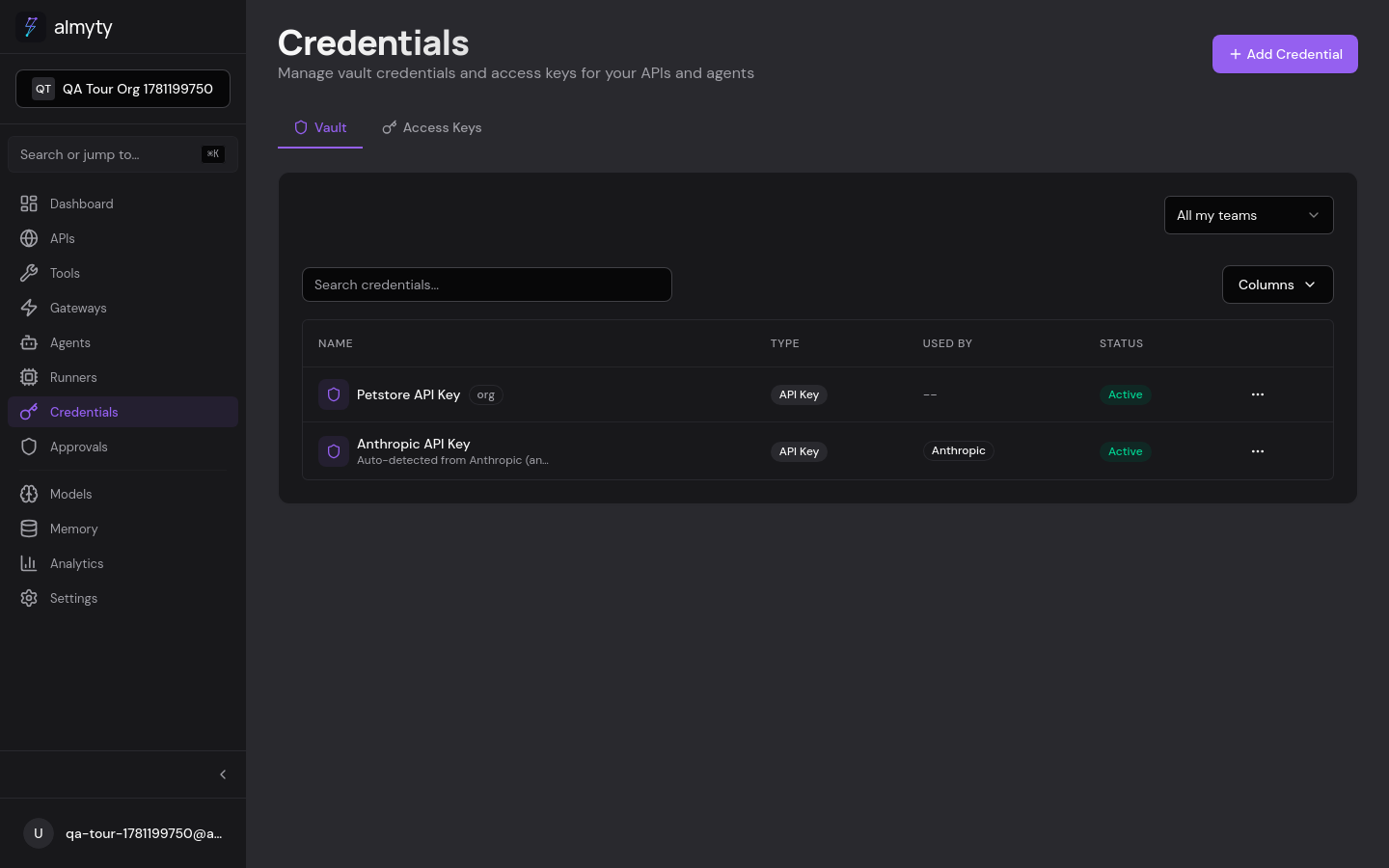
- Go to Credentials in the sidebar
- Open the Access Keys tab
- Click Generate Key
- Pick a name, select the gateway or agent to scope it to, and choose permissions
- Copy the key immediately: it’s shown only once
The key looks like ak_live_abc123.... Use it anywhere a Bearer token is expected:
curl /apis -H "Authorization: Bearer ak_live_abc123..."For CLI tools, run npx @almyty/auth login instead, it opens your browser, authenticates, and stores the key at ~/.almyty/credentials.json so every CLI picks it up automatically.
To revoke: Credentials → Access Keys → menu → Revoke.
Profile
Get Profile
curl https://api.almyty.com/auth/profile \
  -H "Authorization: Bearer $TOKEN"
Update Profile
curl -X PATCH https://api.almyty.com/auth/profile \
  -H "Authorization: Bearer $TOKEN" \
  -H "Content-Type: application/json" \
  -d '{
    "name": "Jane Smith"
  }'
Change Password
curl -X PATCH https://api.almyty.com/auth/change-password \
  -H "Authorization: Bearer $TOKEN" \
  -H "Content-Type: application/json" \
  -d '{
    "currentPassword": "OldPass123!",
    "newPassword": "NewPass456!"
  }'
Organization Context
Most API endpoints are scoped to an organization. How the backend picks the current organization depends on how many memberships the caller has:
- Single-org users: the backend auto-selects your one membership. No extra header is required.
- Multi-org users: you must send the
X-Organization-Idheader on every request. Without it the API returns400 NO_ORGANIZATION. This is a deliberate choice so that multi-org users never silently operate on the wrong org’s data.
# Multi-org user: pick which org to operate on
curl https://api.almyty.com/gateways \
  -H "Authorization: Bearer $TOKEN" \
  -H "X-Organization-Id: 9c0e2f3a-..."
Some endpoints also accept the org id as a path parameter (e.g.
/organizations/{orgId}/tools). In that case the path wins and the
header is ignored, so the path must match a membership you actually
have.
Switching orgs from a multi-org account
If your account belongs to more than one org, just change the
X-Organization-Id header on your next request. The backend validates
that the requested org matches one of your memberships; otherwise the
request is rejected with 400 NO_ORGANIZATION.
Logout
curl -X POST https://api.almyty.com/auth/logout \
  -H "Authorization: Bearer $TOKEN"
This invalidates the current token server-side.