Gateways
Authentication

Gateway Authentication

Every gateway request is authenticated before any tool is executed. almyty enforces a default-deny policy — gateways with no auth configured reject all requests.

Authentication Methods

MethodHeader / ParameterUse Case
NonePublic/development gateways (must be explicitly configured)
API KeyX-API-Key header or api_key query paramMachine-to-machine
Bearer TokenAuthorization: Bearer <token>Programmatic access
Basic AuthAuthorization: Basic <base64>Legacy integrations
JWTAuthorization: Bearer <jwt>Signed, self-contained tokens
OAuth 2.1Authorization: Bearer <oauth-token>Full authorization code flow with PKCE

How Enforcement Works

Every request to /mcp/*, /utcp/*, or /a2a/* passes through the same enforcement pipeline:

  1. Resolve the organization and gateway from the URL
  2. Load all active auth configs for that gateway
  3. If no auth configs exist → reject (401)
  4. Try each required auth method in order — first success wins
  5. If all fail → reject with the last error (401 or 403)
  6. If valid → execute the request

Discovery endpoints (.well-known/*, agent cards) are always public.

Configuring Authentication

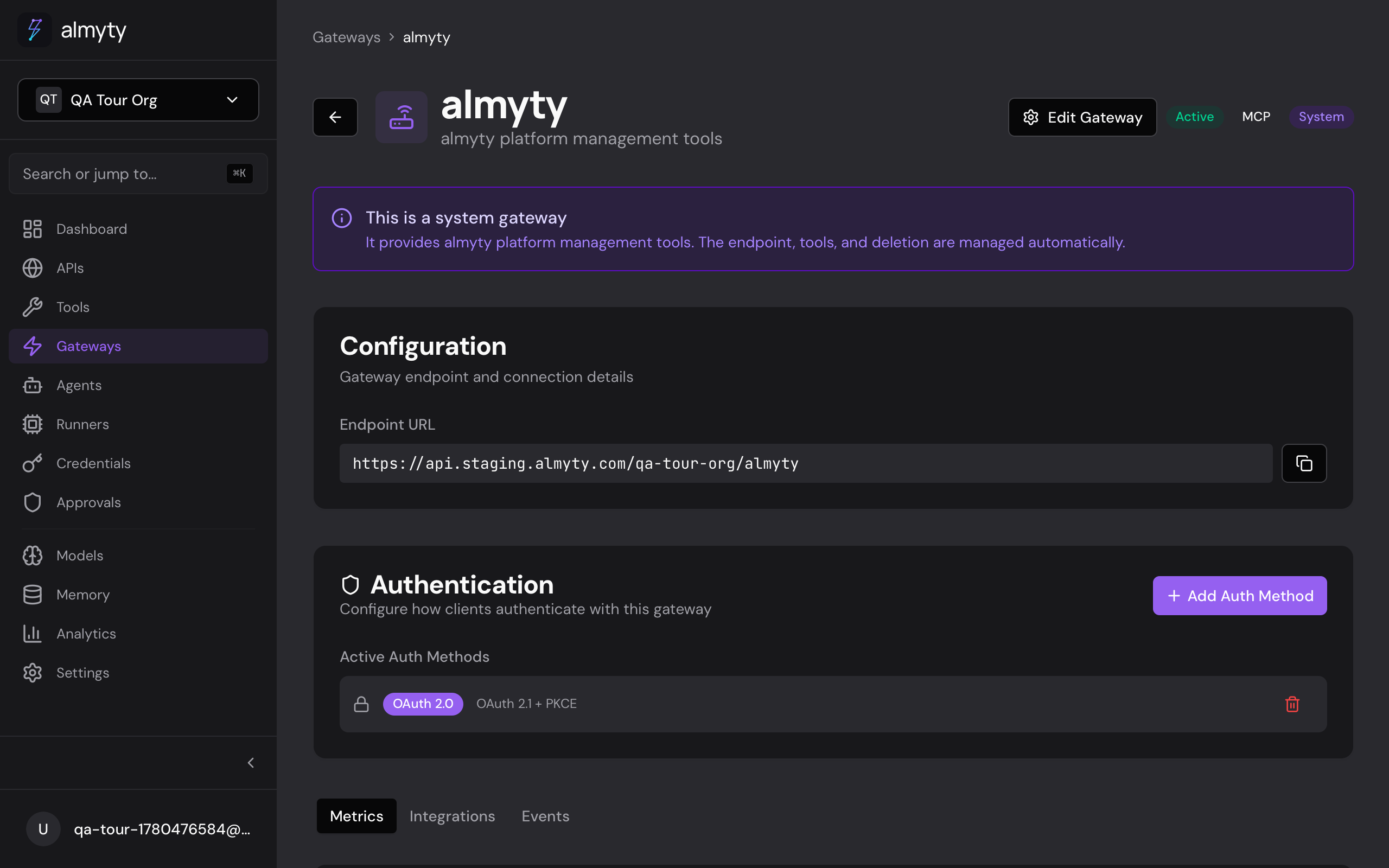
Via the UI

  1. Open the gateway detail page
  2. Click the Authentication tab
  3. Click Add Auth Method
  4. Select the type and configure

Via the API

curl -X POST https://api.almyty.com/gateways/{id}/auth \
  -H "Authorization: Bearer $TOKEN" \
  -H "Content-Type: application/json" \
  -d '{
    "type": "api_key",
    "isRequired": true,
    "configuration": {
      "keyHeader": "X-API-Key"
    }
  }'

API Key Authentication

API keys are stored as SHA-256 hashes in the database. The raw key is only shown once at creation time.

Generate a Key

curl -X POST https://api.almyty.com/gateways/{id}/auth/api-keys \
  -H "Authorization: Bearer $TOKEN" \
  -H "Content-Type: application/json" \
  -d '{
    "name": "Production Key",
    "scopes": ["tools:read", "tools:execute"],
    "expiresAt": "2027-01-01T00:00:00Z"
  }'

Response (key shown once):

{
  "id": "key-uuid",
  "name": "Production Key",
  "key": "almyty_gw_abc123...",
  "scopes": ["tools:read", "tools:execute"],
  "expiresAt": "2027-01-01T00:00:00Z"
}

Using the Key

# Via custom header (default: X-API-Key)
curl https://api.almyty.com/mcp/acme/my-tools \
  -H "X-API-Key: almyty_gw_abc123..."
 
# Via query parameter (default: api_key)
curl "https://api.almyty.com/mcp/acme/my-tools?api_key=almyty_gw_abc123..."

Validation

  • Key is hashed with SHA-256 and looked up in the database
  • Checks: key exists, is active, not expired
  • Supports gateway-specific keys and org-wide keys
  • Optional: min/max key length, regex format validation
  • lastUsedAt is updated on each successful request

Manage Keys

# List keys
curl https://api.almyty.com/gateways/{id}/auth/api-keys \
  -H "Authorization: Bearer $TOKEN"
 
# Revoke a key
curl -X DELETE https://api.almyty.com/gateways/{id}/auth/api-keys/{keyId} \
  -H "Authorization: Bearer $TOKEN"

Bearer Token Authentication

Bearer tokens use the same infrastructure as API keys — they're hashed with SHA-256 and looked up in the ApiKey table.

curl https://api.almyty.com/mcp/acme/my-tools \
  -H "Authorization: Bearer almyty_gw_abc123..."

Basic Auth

Decodes the Authorization: Basic header, looks up the user by email, and verifies the password with bcrypt.

curl https://api.almyty.com/mcp/acme/my-tools \
  -H "Authorization: Basic $(echo -n 'user@example.com:password' | base64)"

The authenticated user's organization membership and roles are included in the auth result.

JWT Authentication

Verifies JWT signature using the secret configured on the auth method (or falls back to the server's JWT_SECRET).

curl https://api.almyty.com/mcp/acme/my-tools \
  -H "Authorization: Bearer eyJhbGciOiJIUzI1NiIs..."

The JWT payload must contain sub or userId. Scopes are read from payload.scopes (array) or payload.scope (space-separated string).

Configure the secret when adding JWT auth to a gateway:

curl -X POST https://api.almyty.com/gateways/{id}/auth \
  -H "Authorization: Bearer $TOKEN" \
  -H "Content-Type: application/json" \
  -d '{
    "type": "jwt",
    "isRequired": true,
    "configuration": {
      "secret": "your-jwt-signing-secret"
    }
  }'

OAuth 2.1 (MCP OAuth)

almyty implements a full OAuth 2.1 authorization server per the MCP specification (opens in a new tab), supporting:

  • Authorization Code flow with PKCE (S256 required)
  • Dynamic Client Registration (RFC 7591)
  • Token Revocation (RFC 7009)
  • Authorization Server Metadata (RFC 8414)
  • Protected Resource Metadata (RFC 9728)

Discovery

Every MCP gateway with OAuth enabled exposes metadata endpoints:

# Authorization server metadata
curl https://api.almyty.com/mcp/acme/my-tools/.well-known/oauth-authorization-server
 
# Protected resource metadata
curl https://api.almyty.com/mcp/acme/my-tools/.well-known/oauth-protected-resource

Client Registration

Clients register dynamically before starting the OAuth flow:

curl -X POST https://api.almyty.com/mcp/acme/my-tools/register \
  -H "Content-Type: application/json" \
  -d '{
    "client_name": "My MCP Client",
    "redirect_uris": ["http://localhost:3000/callback"],
    "grant_types": ["authorization_code", "refresh_token"],
    "response_types": ["code"],
    "token_endpoint_auth_method": "none"
  }'

Response:

{
  "client_id": "mcp_client_abc123...",
  "client_name": "My MCP Client",
  "redirect_uris": ["http://localhost:3000/callback"],
  "grant_types": ["authorization_code", "refresh_token"],
  "response_types": ["code"],
  "token_endpoint_auth_method": "none",
  "client_id_issued_at": 1711234567
}

Redirect URIs must use HTTPS, except localhost and 127.0.0.1 for development.

Authorization Code Flow

Step 1 — Redirect the user to the authorize endpoint:

GET https://api.almyty.com/mcp/acme/my-tools/authorize
  ?response_type=code
  &client_id=mcp_client_abc123...
  &redirect_uri=http://localhost:3000/callback
  &code_challenge=E9Melhoa2OwvFrEMTJguCHaoeK1t8URWbuGJSstw-cM
  &code_challenge_method=S256
  &scope=tools:read tools:execute
  &state=random-state-value
  • code_challenge_method=S256 is mandatory (OAuth 2.1 requires PKCE)
  • If the user is not logged in, they're redirected to the login page first
  • After authentication, an authorization code is generated (10-minute lifetime)

Step 2 — Exchange the code for tokens:

curl -X POST https://api.almyty.com/mcp/acme/my-tools/token \
  -H "Content-Type: application/x-www-form-urlencoded" \
  -d "grant_type=authorization_code\
  &code=auth_code_here\
  &redirect_uri=http://localhost:3000/callback\
  &client_id=mcp_client_abc123...\
  &code_verifier=dBjftJeZ4CVP-mB92K27uhbUJU1p1r_wW1gFWFOEjXk"

Response:

{
  "access_token": "almyty_at_...",
  "token_type": "bearer",
  "expires_in": 3600,
  "refresh_token": "almyty_rt_...",
  "scope": "tools:read tools:execute"
}
  • Access tokens expire in 1 hour
  • Refresh tokens expire in 30 days
  • Both are stored as SHA-256 hashes (never plaintext)

Step 3 — Use the access token:

curl -X POST https://api.almyty.com/mcp/acme/my-tools \
  -H "Authorization: Bearer almyty_at_..." \
  -H "Content-Type: application/json" \
  -d '{
    "jsonrpc": "2.0",
    "method": "tools/list",
    "id": 1
  }'

Refreshing Tokens

curl -X POST https://api.almyty.com/mcp/acme/my-tools/token \
  -H "Content-Type: application/x-www-form-urlencoded" \
  -d "grant_type=refresh_token\
  &refresh_token=almyty_rt_...\
  &client_id=mcp_client_abc123..."

Refresh tokens are rotated — the old refresh token is revoked when a new one is issued.

Revoking Tokens

curl -X POST https://api.almyty.com/mcp/acme/my-tools/revoke \
  -H "Content-Type: application/x-www-form-urlencoded" \
  -d "token=almyty_at_...&client_id=mcp_client_abc123..."

Revoking a refresh token also revokes all associated access tokens. Per RFC 7009, this endpoint always returns 200.

Security Properties

  • PKCE mandatory — Only S256, no plain
  • One-time codes — Authorization codes are marked used after exchange
  • Replay detection — Reused codes trigger a warning
  • Token rotation — Old refresh tokens are revoked on refresh
  • Hash-only storage — Tokens stored as SHA-256 hashes, never plaintext

IP Restrictions

Any auth method can include IP restrictions:

{
  "validationRules": {
    "allowedIpRanges": ["10.0.0.0/8", "192.168.1.100"]
  }
}

Supports CIDR notation and individual IPs. Requests from non-whitelisted IPs are rejected.

Required Headers

Force clients to include specific headers:

{
  "validationRules": {
    "requiredHeaders": ["X-Request-Id", "X-Client-Version"]
  }
}

Multiple Auth Methods

A gateway can have multiple auth methods. Each method is either required or optional:

  • Required methods are tried in order — the first one that matches wins
  • Optional methods provide fallback — if all are optional and none match, the request is rejected
  • You can combine methods for gradual migration (e.g., add OAuth while keeping API keys)

Key Scopes

ScopeDescription
tools:readList and view tool definitions
tools:executeExecute/invoke tools
gateway:readView gateway configuration

Error Responses

On authentication failure, gateways return:

{
  "error": "Unauthorized",
  "message": "Invalid or expired API key",
  "statusCode": 401
}

MCP endpoints include a WWW-Authenticate header pointing to the OAuth metadata URL, per the MCP spec:

WWW-Authenticate: Bearer resource_metadata="https://api.almyty.com/mcp/acme/my-tools/.well-known/oauth-protected-resource"