HTTP Tools
An HTTP tool turns any REST endpoint into an agent-callable action. You control the method, URL, headers, query parameters, and body, and you map tool inputs into each of them with template expressions. Use these when no imported schema exists (auto-generated API tools already cover imported schemas) and you want to wire up a single endpoint by hand.
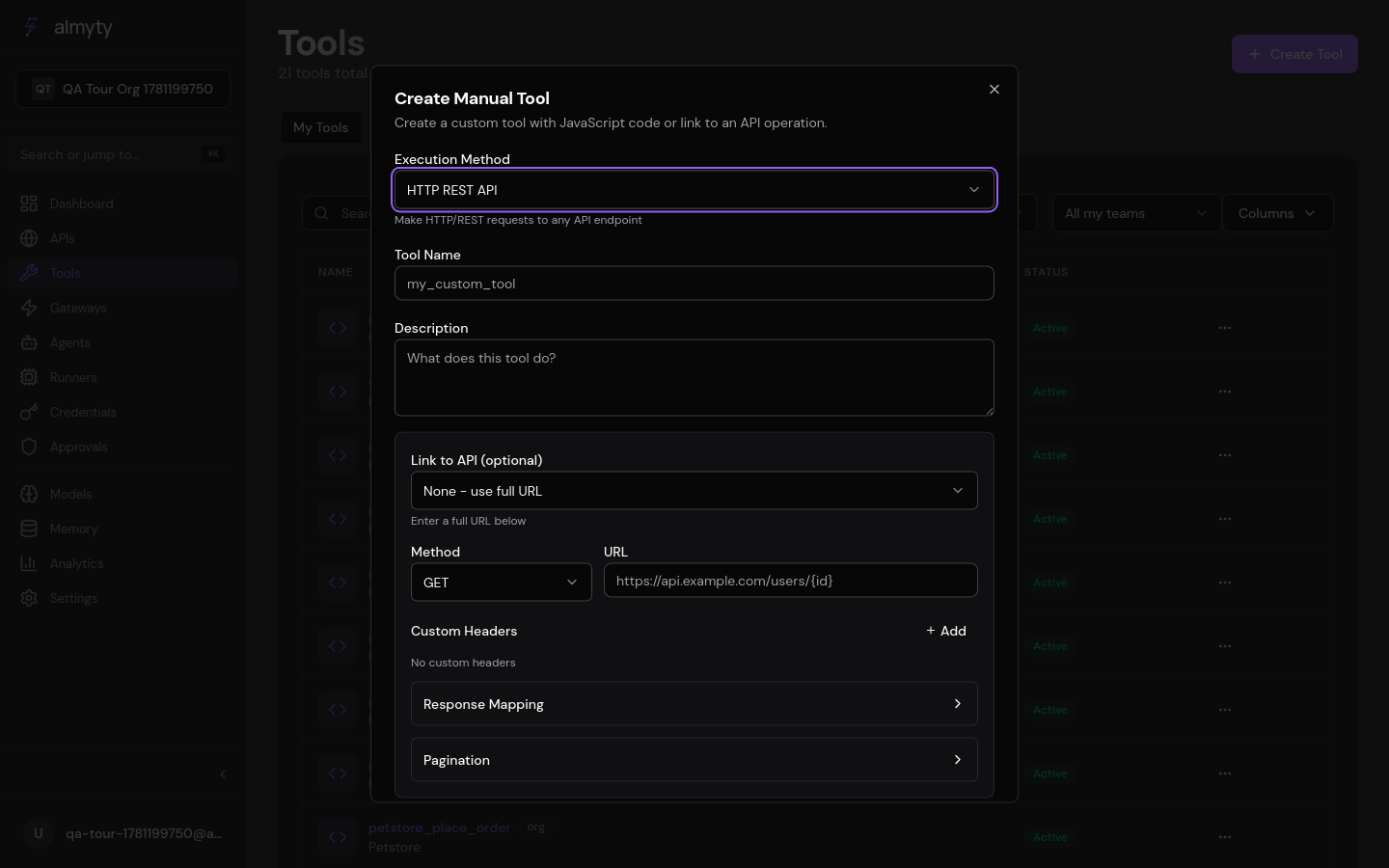
Create one in the UI
- Open Tools, click Create Tool, select HTTP.
- Give it a name and description (the description is what agents read when deciding to call it).
- Configure the request:
- Method:
GET,POST,PUT,PATCH, orDELETE - URL: full endpoint, with
{{parameters.*}}expressions inline - Headers: key/value pairs, including auth headers
- Query parameters: appended to the URL at execution time
- Body: JSON or text with template expressions (POST/PUT/PATCH)
- Method:
- Define input parameters in the schema builder. These become
{{parameters.*}}in the URL, headers, and body. - Optionally set timeout and retry count.
- Click Create.
Template expressions
{{parameters.*}} and {{env.*}} expressions resolve in URLs, headers, query
params, and body fields:
URL:     https://api.example.com/users/{{parameters.userId}}
Header:  Authorization: Bearer {{parameters.token}}
Body:    { "name": "{{parameters.name}}", "email": "{{parameters.email}}" }
Custom code
For request logic that templates cannot express, switch to the code editor and
write JavaScript. The axios library is available as a global:
const response = await axios({
  method: 'POST',
  url: `https://api.example.com/search`,
  headers: {
    'Authorization': `Bearer ${parameters.apiKey}`,
    'Content-Type': 'application/json',
  },
  data: {
    query: parameters.query,
    filters: parameters.filters || {},
  },
  timeout: 10000,
});

return {
  results: response.data.items,
  total: response.data.total,
};
The tool definition
The request config is the tool. A weather-lookup HTTP tool defines its inputs
and maps them into a GET request:
{
  "name": "fetch_weather",
  "description": "Fetch current weather for a city",
  "type": "http",
  "parameters": {
    "type": "object",
    "properties": {
      "city": {
        "type": "string",
        "description": "City name"
      },
      "units": {
        "type": "string",
        "enum": ["metric", "imperial"],
        "default": "metric"
      }
    },
    "required": ["city"]
  },
  "executionConfig": {
    "method": "GET",
    "url": "https://api.weather.example.com/v1/current",
    "headers": {
      "X-API-Key": "{{env.WEATHER_API_KEY}}"
    },
    "queryParams": {
      "q": "{{parameters.city}}",
      "units": "{{parameters.units}}"
    }
  }
}
Configuration reference
| Field | Type | Default | Description |
|---|---|---|---|
method | string | (required) | HTTP method: GET, POST, PUT, PATCH, DELETE |
url | string | (required) | Full URL, supports template expressions |
headers | object | {} | Request headers, supports template expressions |
queryParams | object | {} | Query string parameters |
body | object/string | (none) | Request body (for POST/PUT/PATCH) |
timeout | number | 30000 | Request timeout in milliseconds |
retries | number | 0 | Number of retry attempts on failure |
Authentication
Reference vaulted credentials with {{env.*}} expressions in headers so secrets
never live in the tool body:
API Key
{
  "headers": {
    "X-API-Key": "{{env.API_KEY}}"
  }
}
Bearer Token
{
  "headers": {
    "Authorization": "Bearer {{env.ACCESS_TOKEN}}"
  }
}
Basic Auth
{
  "headers": {
    "Authorization": "Basic {{base64(env.USERNAME + ':' + env.PASSWORD)}}"
  }
}
Error handling
| Status Code | Behavior |
|---|---|
| 2xx | Success. Response body is returned. |
| 4xx | Client error. Error message returned to the caller. |
| 5xx | Server error. Retried if retries > 0, then error. |
| Timeout | Request timed out. Error returned. |
| Network | Connection failed. Retried if configured. |
Custom code can implement additional error handling logic.