Providers API
This page is for developers who want to connect AI model providers from their own code. A provider is a company whose AI models you use (for example OpenAI, Anthropic or Mistral), connected once with your own key. For example, a setup script for a new organization can connect its provider keys in one call. In the app, this is Models → Connect a provider; see Connect a provider.
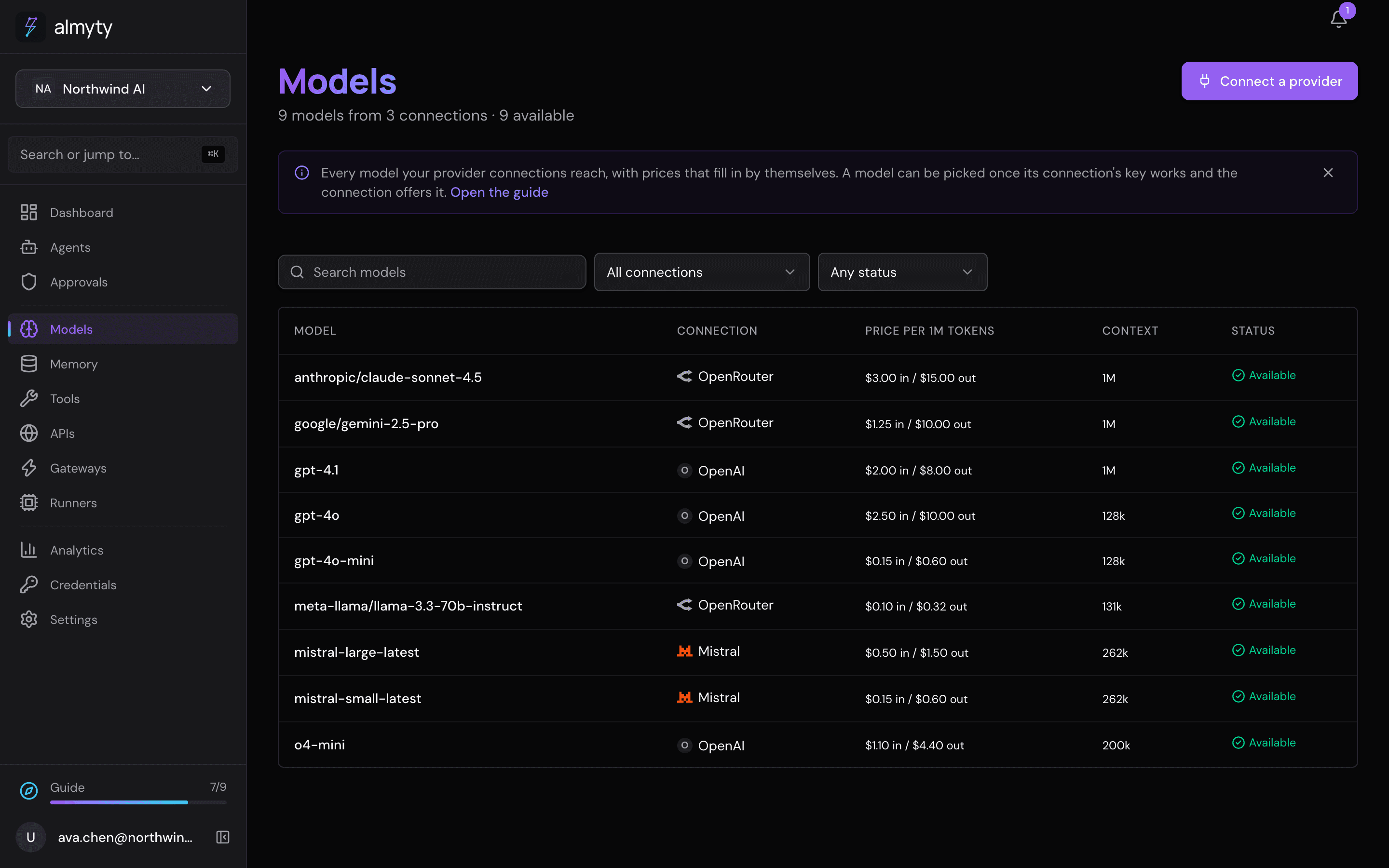
REST API reference for connecting and managing providers.
Endpoints
| Method | Endpoint | Description |
|---|---|---|
POST | /llm-providers/connect | Connect a provider: save it, check the key, list its models, in one request (admin/owner) |
GET | /llm-providers | List all providers |
POST | /llm-providers | Add a provider without waiting for its check (admin/owner) |
GET | /llm-providers/provider-types | Every vendor the platform can call, with display name, features, key/docs links and listsModels |
POST | /llm-providers/test-connection | Probe a {type, apiKey} pair before saving it |
POST | /llm-providers/models/by-type | List a vendor’s models from a {type, apiKey} pair, before saving |
GET | /llm-providers/:id | Get provider by ID |
PATCH | /llm-providers/:id | Update a provider (admin/owner) |
DELETE | /llm-providers/:id | Delete a provider (admin/owner); the owners of agents that used its models are told they are no longer available |
GET | /llm-providers/:id/agents | The agents whose model runs on this connection: { agents: [{ id, name }], others }, named when the caller can see them and counted in others otherwise |
GET | /llm-providers/:id/usage | Request, token, and cost totals for one provider |
GET | /llm-providers/:id/models | Models this saved provider currently lists |
POST | /llm-providers/:id/test | Check the key again |
POST | /llm-providers/:id/chat | Send a chat message |
Connect a provider
One request that saves the provider, checks its key with one real call, and lists its models. On success every model it lists is usable. On failure nothing is saved.
curl -X POST https://api.almyty.com/llm-providers/connect \
  -H "Authorization: Bearer $TOKEN" \
  -H "Content-Type: application/json" \
-d '{ "type": "openai", "configuration": { "apiKey": "sk-..." } }'| Parameter | Type | Required | Description |
|---|---|---|---|
type | string | Yes | The provider type, as GET /llm-providers/provider-types lists it |
name | string | No | The connection’s name, shown in every model chooser. Defaults to the provider’s own name; several connections of one provider can each have their own |
configuration | object | No | The key and the few fields the type needs, as for Add a Provider: apiKey, apiUrl (your own server, Ollama), bedrock.region, azure.resourceName and azure.deploymentName, vertex.projectId, runpod.endpointId, and model for a type whose listsModels is false |
credentialId | uuid | No | Use a saved connection instead of pasting a key |
visibility | string | No | org (default), team or private |
teamId | uuid | No | With visibility: team |
allowNewModels, hiddenModels, allowedModels | No | Which models the connection offers; see Which models a connection offers. Every model, new ones included, when left out |
{
  "success": true,
  "data": {
    "provider": { "id": "7c1e...", "name": "OpenAI", "type": "openai", "isHealthy": true, "...": "..." },
    "models": [{ "id": "4f2a...", "vendorModelId": "gpt-5", "selectable": true, "effectivePricing": { "inPerMTok": 1.25, "outPerMTok": 10 }, "...": "..." }],
    "check": { "ok": true, "responseTime": 412 }
  }
}
A failure answers 400 with one plain sentence in message, the vendor’s own words in detail and the vendor’s key page in keyUrl:
error | When |
|---|---|
KEY_REJECTED | The vendor refused the key: "OpenAI rejected this key." |
CHECK_FAILED | The check did not pass for another reason (unreachable, timeout, a model the key cannot use): "Could not connect to OpenAI." |
MODEL_REQUIRED | The type serves no model list and no configuration.model was given |
INVALID_CONFIGURATION | A required field is missing or the URL is not allowed |
The vendor’s own 401 never reaches you as a 401, so a client does not mistake it for its own session ending.
Which models a connection offers
Every model a connection’s key reaches is offered by default. Three fields, on connect, create and PATCH /llm-providers/:id, narrow that:
| Field | Type | Description |
|---|---|---|
allowNewModels | boolean | true (default): every model is offered except hiddenModels, and a model the provider lists later is offered at once. false: only allowedModels, and a model listed later waits until it is added |
hiddenModels | string[] | null | Vendor model ids not offered while allowNewModels is true |
allowedModels | string[] | null | Vendor model ids offered while allowNewModels is false. May be empty: the connection is then paused and offers nothing |
Both lists are kept whichever way the switch is set, so flipping it back loses nothing. Pin a key to one model:
curl -X PATCH https://api.almyty.com/llm-providers/7c1e... \
  -H "Authorization: Bearer $TOKEN" \
  -H "Content-Type: application/json" \
  -d '{ "allowNewModels": false, "allowedModels": ["meta-llama/Llama-3.3-70B-Instruct"] }'
A model the connection does not offer reads allowed: false and selectable: false on GET /models, the router never plans it, and a chat call that names it through this connection answers 400 with MODEL_NOT_ALLOWED before anything reaches the provider. A call that names no model uses the connection’s default model when it is offered, else the best offered one. Changing these fields spends no key check. A change that would take away a model an agent uses is refused with 409 and MODEL_IN_USE; the body names the models, the agents the caller can see ({ id, name }) and a count of otherAgents, and nothing is saved. A rename changes the name of the key the connection made for itself too.
Add a provider
type picks the vendor, and everything else about the connection (the key, the base URL, the default call parameters) lives under configuration.
curl -X POST https://api.almyty.com/llm-providers \
  -H "Authorization: Bearer $TOKEN" \
  -H "Content-Type: application/json" \
  -d '{
    "name": "OpenAI Production",
    "type": "openai",
    "configuration": {
      "apiKey": "sk-...",
      "model": "gpt-4o",
      "temperature": 0.7,
      "maxTokens": 4096
    }
  }'
Parameters
| Parameter | Type | Required | Description |
|---|---|---|---|
name | string | Yes | Display name, max 100 characters |
type | string | Yes | Vendor key. One of the values GET /llm-providers/provider-types returns: openai, anthropic, google, mistral, ollama, azure_openai, aws_bedrock, custom, and the rest. An unknown value is rejected. |
configuration | object | Yes | Connection and default call settings; see below |
description | string | No | Max 1000 characters |
credentialId | uuid | No | Point at an existing connection instead of pasting configuration.apiKey. null clears the reference |
usageCredentialId | uuid | No | Connection holding the admin key for the vendor’s usage/cost API |
capabilities | object | No | {supportedModels, maxTokens, supportsFunctionCalling, supportsStreaming, supportsBatching, supportsVision, supportsAudio, supportsToolUse, supportedToolFormats} |
metadata | object | No | {version, region, endpoint, modelInfo} |
visibility | org | team | private | No | Who in the organization sees the provider |
teamId | string | No | The owning team when visibility is team |
allowNewModels, hiddenModels, allowedModels | No | Which models it offers; see above |
Creating, updating, and deleting a provider require the admin or owner role. Reading, testing, and chatting are open to member as well.
configuration
Every field is optional; what a given vendor needs depends on its type.
| Field | Type | Description |
|---|---|---|
apiKey | string | The pasted key. It becomes a Credential row rather than a column on the provider, and reads back masked |
usageApiKey | string | Admin or org-scoped key for the vendor’s usage/cost API, where the vendor publishes one |
apiUrl | string | Base URL override: self-hosted servers, regional endpoints, and OpenAI-compatible hosts |
apiVersion | string | Vendor API version, where the vendor pins one |
model | string | Default model for calls that do not name one |
maxTokens, temperature, topP, topK, frequencyPenalty, presencePenalty | number | Default call parameters |
timeout, retries | number | Per-call timeout in milliseconds, and retry count |
rateLimits | object | {requestsPerMinute, requestsPerHour, tokensPerMinute, tokensPerHour} |
azure | object | {deploymentName, resourceName, apiVersion} |
bedrock | object | {region, accessKeyId, secretAccessKey, sessionToken} |
huggingface | object | {endpoint, taskType} |
custom | object | {headers, authMethod, requestFormat} for an OpenAI-compatible host that needs shaping |
Response
The provider comes back with its secrets stripped: configuration is reduced to the non-secret call settings, and the key is referenced rather than returned.
{
  "success": true,
  "data": {
    "id": "prov-uuid",
    "name": "OpenAI Production",
    "type": "openai",
    "status": "active",
    "configuration": {
      "model": "gpt-4o",
      "maxTokens": 4096,
      "temperature": 0.7,
      "apiUrl": null
    },
    "totalRequests": 0,
    "totalCost": 0,
    "createdAt": "2026-03-01T10:00:00Z"
  },
  "message": "Provider added"
}
status is one of active, inactive, error, or maintenance.
Test connection
Verify a saved provider is configured correctly. The platform makes one short real call, using the provider’s configured model or, when it has none, whatever the vendor currently serves:
curl -X POST https://api.almyty.com/llm-providers/{id}/test \
  -H "Authorization: Bearer $TOKEN"
{
"success": true,
"data": {
"isHealthy": true,
"responseTime": 450
},
"message": "Connection test completed"
}A failed probe returns isHealthy: false with an error string rather than an HTTP error.
To check a key before saving anything, post the pair to /llm-providers/test-connection:
curl -X POST https://api.almyty.com/llm-providers/test-connection \
  -H "Authorization: Bearer $TOKEN" \
  -H "Content-Type: application/json" \
  -d '{ "type": "openai", "apiKey": "sk-..." }'
That returns {ok, latencyMs, modelCount}. Ollama is keyless, so apiKey may be omitted for it.
Send a chat message
The body is a message list, not a single string:
curl -X POST https://api.almyty.com/llm-providers/{id}/chat \
  -H "Authorization: Bearer $TOKEN" \
  -H "Content-Type: application/json" \
  -d '{
    "messages": [
      { "role": "user", "content": "Hello, what can you do?" }
    ],
    "sessionId": "optional-session-uuid"
  }'
messages is required. model overrides the provider default; maxTokens (1–200000), temperature (0–2), topP (0–1), topK (0–100), frequencyPenalty and presencePenalty (−2–2), stopSequences, tools, toolIds, and stream are all optional. Pass routing instead of model to let the model catalog pick, in which case the response carries a routing attribution saying which card answered.
Sessions maintain conversation history. Omit sessionId for one-off messages.
Supported providers
Which vendors almyty can call is registry data, not a list frozen in these docs, and which models are usable is a property of your organization’s catalog rather than of the platform. Three endpoints answer it live:
| Question | Call |
|---|---|
| Which vendor types exist? | GET /llm-providers/provider-types |
| What does this saved provider currently serve? | GET /llm-providers/:id/models |
| What would this key serve, before I save it? | POST /llm-providers/models/by-type with {type, apiKey} |
A model is usable once it is active, points at a callable provider, and that provider’s key check has passed; the check covers every model the provider lists. GET /models lists them with that state and POST /models/sync reads a provider’s list again. See the Models guide for the whole flow.
custom is the escape hatch: any OpenAI-compatible API, pointed at with configuration.apiUrl and shaped with configuration.custom.