Compliance pack
Make safety filters mandatory for every agent in your organization, and get a report you can hand to an auditor. For example: credit card numbers and email addresses never appear in your logs or in answers to outside systems, and any risky request is blocked, not just logged.
almyty has two built-in safety filters that any agent can use:
- PII filter: hides personal data (PII, personally identifiable information) such as email addresses, phone numbers, credit card numbers and social security numbers, wherever it is kept or leaves almyty: the record of each tool call, the steps a run shows under Runs (a workflow run’s once it has finished), the audit log, and the answers a tool gives to an outside caller through a gateway. It does not change what a tool is called with: a tool that looks up a calendar or searches mail gets the real address, or it would look up the wrong thing.
- Security scanner: checks requests, responses and tool inputs for attack patterns (such as attempts to inject database commands or scripts) and acts on what it finds above a severity you choose.
Without the compliance pack each agent opts in on its own. The compliance pack, on the Business and Enterprise plans, turns them into an organization-wide rule. It is the practical side of the Compliance page: regulators want controls that apply everywhere, not good intentions agent by agent.
Set the organization policy
Owners and admins do this under Settings → Advanced → Compliance.
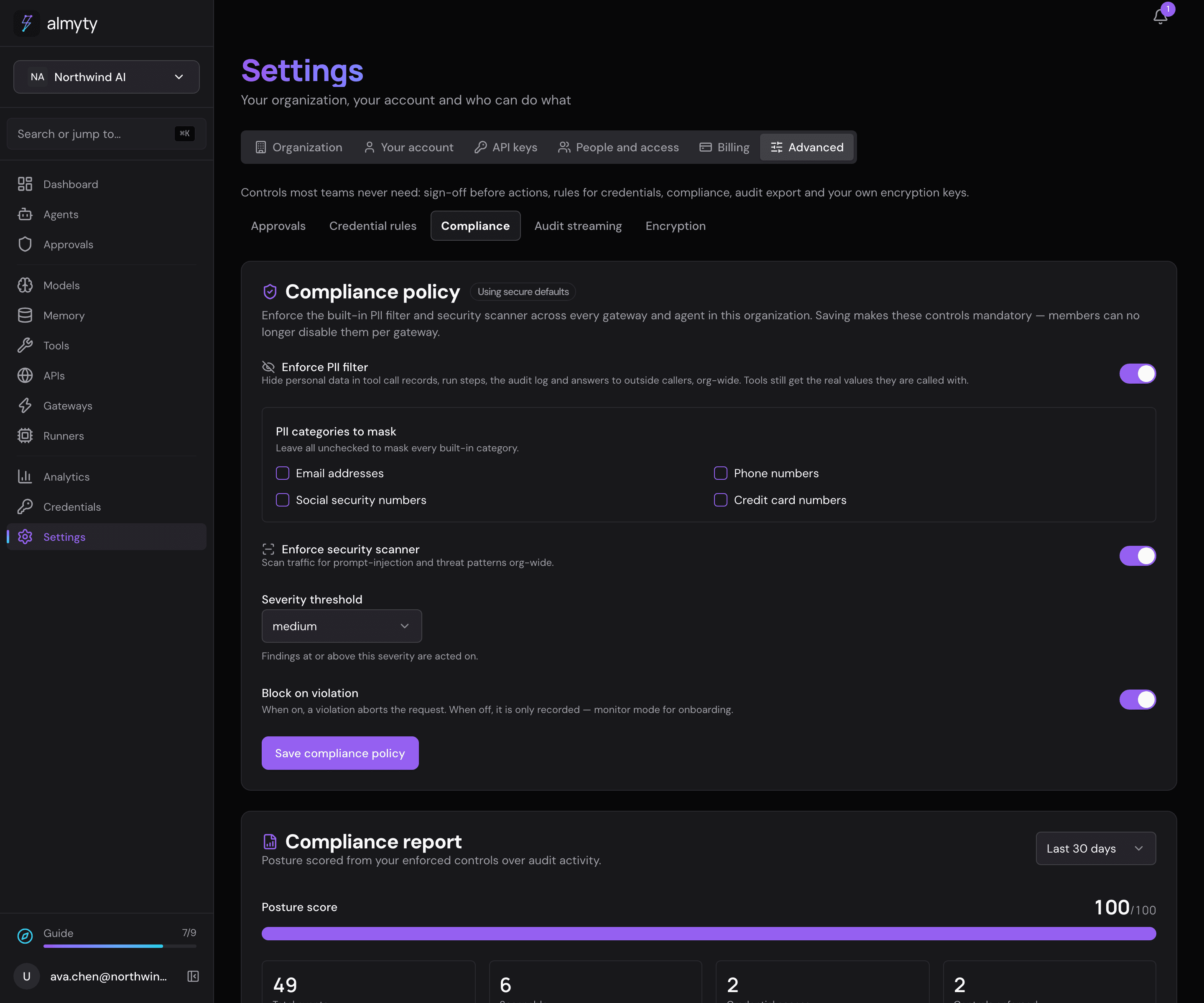
- Turn Enforce PII filter and Enforce security scanner on or off.
- Under PII categories to mask, pick which kinds of personal data to hide. Picking none hides all of them.
- Choose the Severity threshold at which the security scanner acts.
- Turn on Block on violation to stop the offending call, or off to only record it.
- Click Save compliance policy.
Safe by default. Until an admin saves a policy, both filters are enforced, at medium severity, and violations are blocked. Saving a policy can only relax that, and does so on purpose. The page always shows the policy in effect and whether it is the default.
The posture report
The same page shows a report you can attach to a compliance file. Pick Last 7 days, Last 30 days or Last 90 days and click Download JSON to save it. It contains:
- The policy in effect for that period.
- Enforced controls: for each filter, whether it is enforced and its settings.
- Activity from the audit log: total events, events by action, how many could be scanned, and how often credentials were accessed.
- Posture score (0 to 100): a blunt summary. 40 points for each enforced filter and 20 for blocking. Full marks means both filters are enforced and violations are blocked, not merely logged.
For developers
The policy:
{
  "enforcedPlugins": ["pii-filter", "security-scanner"],
  "securityThreshold": "medium",
  "blockOnViolation": true,
  "piiCategories": []
}| Field | Values | Meaning |
|---|---|---|
enforcedPlugins | pii-filter, security-scanner | which built-in guardrails are mandatory org-wide |
securityThreshold | low | medium | high | critical | severity at which the security scanner acts |
blockOnViolation | boolean | block the offending call, or log and continue |
piiCategories | string[] | PII categories to filter; empty means all |
Reading the policy back returns the effective policy and whether it is the default or configured. The report defaults to the last 30 days; the endpoint and its date range are in the API reference.
Related
- Compliance: what the regulations ask and what almyty provides
- Approval policies: human sign-off for consequential actions
- Audit export: get the evidence trail into your security tools