Skills CLI
The Skills CLI installs SKILL.md files into your project so AI coding agents can discover and use your APIs. Skills follow the Agent Skills specification — compact markdown documents that teach an LLM how to call a specific tool, including parameters, authentication, and examples.
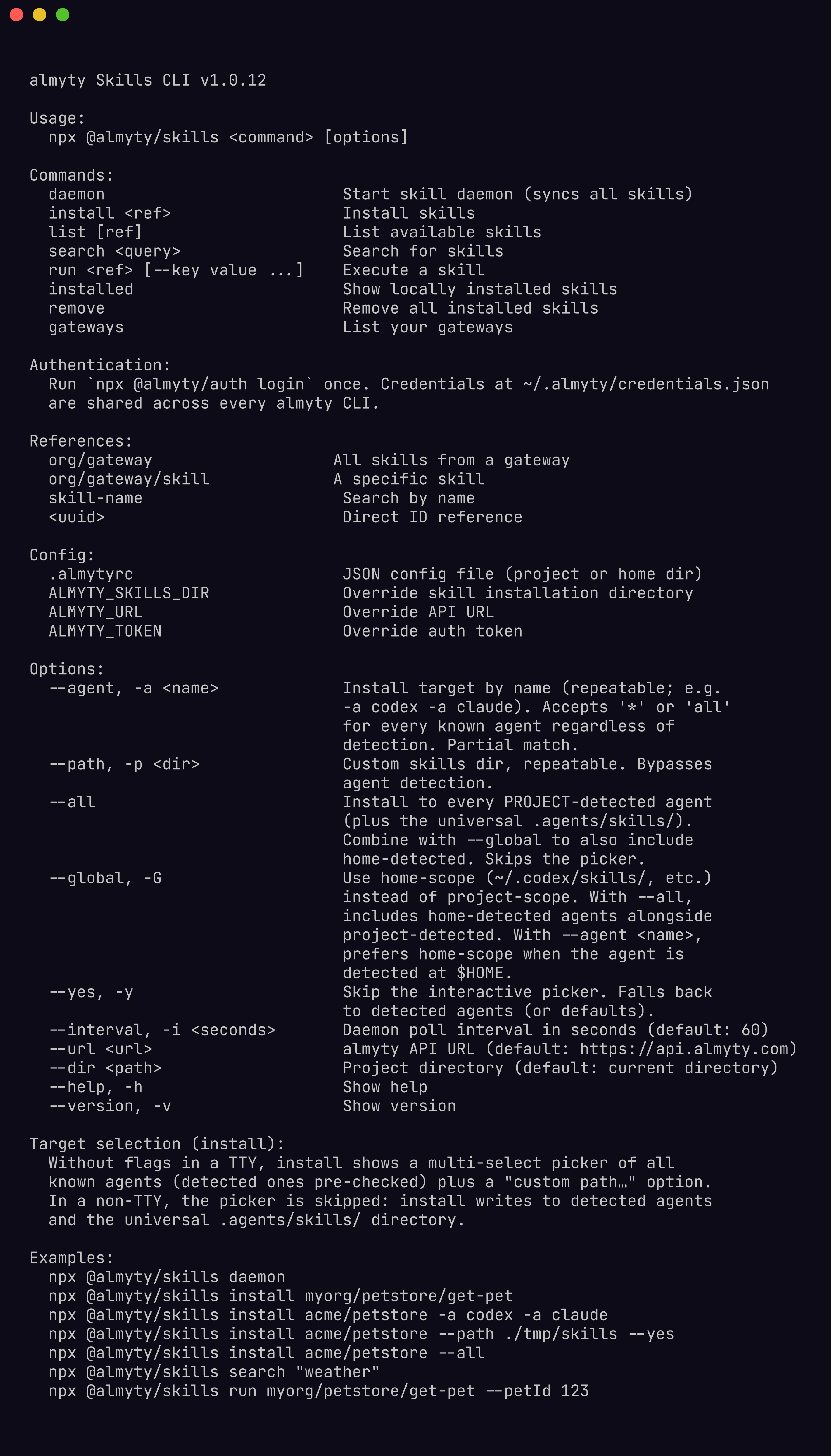
$ npx @almyty/skills --helpConcepts
Skills are markdown files (SKILL.md) that describe a single API tool. They live in agent-specific directories inside your project. When an AI coding agent starts, it reads these files and learns how to call your APIs.
Gateways are the server-side grouping. You assign tools to a gateway in the almyty dashboard, and the Skills CLI fetches the generated SKILL.md files for those tools.
References identify what you want to install or run:
| Format | Example | Resolves to |
|---|---|---|
@org/gateway | @acme/petstore | All skills from the petstore gateway in the acme org |
@org/gateway/skill | @acme/petstore/get-pet | A single skill |
<name> | get-pet | Search by name across all gateways |
<uuid> | 550e8400-... | Direct gateway or tool ID |
Listing gateways
See which gateways are available in your organization:
$ npx @almyty/skills gateways
Your gateways:

  Petstore API
    Type: skills
    Use:  npx @almyty/skills install @acme/petstore

  Internal Tools
    Type: mcp
    Use:  npx @almyty/skills install @acme/internal-tools
Discovering skills
List all available skills, or scope to a specific gateway:
# All skills across all gateways
$ npx @almyty/skills list

# Skills from a specific gateway
$ npx @almyty/skills list @acme/petstore
Search by keyword when you know what you need but not where it lives:
$ npx @almyty/skills search "create user"
Found 3 skill(s):

  @acme/user-api/create-user -- Create a new user account
  @acme/admin-tools/create-user -- Create user (admin)
  @acme/user-api/bulk-create-users -- Create multiple users at once
Installing skills
Install all skills from a gateway:
$ npx @almyty/skills install @acme/petstore
Fetching skills...

@acme/petstore (5 skill(s))

  Claude Code: 5 skills -> .claude/skills
  Cursor: 5 skills -> .agents/skills

Installed 10 skill files across 2 agent(s).
Skills will be automatically loaded by your AI coding agent.
Install a single skill:
$ npx @almyty/skills install @acme/petstore/get-petThe CLI detects which AI agents are configured in your project and writes SKILL.md files to the correct directories. Each skill gets its own folder:
.claude/skills/almyty-get-pet/SKILL.md
.claude/skills/almyty-list-pets/SKILL.md
.agents/skills/almyty-get-pet/SKILL.md
.agents/skills/almyty-list-pets/SKILL.md
Agent detection
The CLI auto-detects 30+ AI coding agents by looking for their config directories:
| Agent | Detection | Skills directory |
|---|---|---|
| Claude Code | .claude/ | .claude/skills/ |
| Cursor | .cursor/ | .agents/skills/ |
| Windsurf | .windsurf/ | .windsurf/skills/ |
| GitHub Copilot | .github/copilot/ | .agents/skills/ |
| Codex | .codex/ | .agents/skills/ |
| Gemini CLI | .gemini/ | .agents/skills/ |
If no agents are detected, the CLI defaults to .claude/skills/ and .agents/skills/ (the cross-client standard from agentskills.io).
Checking installed skills
See what is currently installed in your project:
$ npx @almyty/skills installed
Claude Code (.claude/skills):
  get-pet
  list-pets
  create-pet
Removing skills
Remove all almyty-installed skills from every detected agent directory:
$ npx @almyty/skills remove
  Removed 5 skills from .claude/skills
  Removed 5 skills from .agents/skills

Removed 10 skill(s) total.
Only files in almyty-* subdirectories are removed. Your other skills are untouched.
Running skills directly
Execute a skill from the command line without an AI agent:
$ npx @almyty/skills run @acme/petstore/get-pet --petId 123
{
  "id": 123,
  "name": "Buddy",
  "status": "available"
}
Parameters are passed as --key value flags. The output is the raw JSON response from the API. This is useful for testing that skills work before handing them to an agent.
Daemon mode
Start a background process that keeps all your skills in sync. The daemon polls all gateways and updates SKILL.md files whenever tools are added, removed, or modified:
$ npx @almyty/skills daemon
almyty skill daemon (every 60s)
Syncing to 2 agent target(s):
  Claude Code: .claude/skills
  Universal (.agents/skills): .agents/skills

Press Ctrl+C to stop.

[10:32:01] Synced 8 skills to 2 agent(s).
Change the poll interval with --interval:
$ npx @almyty/skills daemon --interval 30Watching a specific gateway
If you only care about one gateway, use watch instead of daemon:
$ npx @almyty/skills watch @acme/petstore
Watching Petstore API (every 60s)
Syncing to 2 agent target(s):
  Claude Code: .claude/skills
  Universal (.agents/skills): .agents/skills

Press Ctrl+C to stop.

[10:32:01] Synced 5 skills to 2 agent(s).
The watch command syncs skills from that single gateway, while daemon syncs all gateways in your organization.
Configuration
.almytyrc file
Create a .almytyrc JSON file in your project root (or home directory) to set defaults:
{
  "url": "https://api.staging.almyty.com",
  "interval": 30,
  "agents": ["Claude Code", "Cursor"],
  "skillsDir": "./my-custom-skills-dir"
}| Field | Description |
|---|---|
url | Override the almyty API URL |
interval | Daemon/watch poll interval in seconds |
agents | Restrict installation to specific agents (case-insensitive partial match) |
skillsDir | Override the skills directory (bypasses agent detection) |
The CLI checks the project directory first, then falls back to ~/.almytyrc.
Environment variables
| Variable | Description |
|---|---|
ALMYTY_SKILLS_DIR | Override the skills directory (highest priority, bypasses agent detection and .almytyrc) |
ALMYTY_URL | Override the API URL |
ALMYTY_TOKEN | Override the auth token |
Common workflows
Install skills for your team’s API
$ npx @almyty/auth login
$ npx @almyty/skills install @myorg/internal-api
$ git add .claude/skills .agents/skills
$ git commit -m "Add almyty skills for internal API"
Commit the skills so every team member gets them without running the CLI.
Keep skills synced during development
While actively developing your API, run the daemon so skill files stay current as you add or modify tools:
$ npx @almyty/skills watch @myorg/internal-api --interval 10CI: install skills before agent runs
$ export ALMYTY_TOKEN=${{ secrets.ALMYTY_TOKEN }}
$ npx @almyty/skills install @myorg/internal-api
$ claude "Run the integration tests using the internal API"