Downloadable apps
Give people your assistant as an app they install: a desktop app for Mac, Windows or Linux, or a terminal app for people who work at the command line. For example, your sales team downloads a “Northwind Sales” app and chats with the assistant in its own window, with your name and colours on it.
almyty builds the app on its own machines and gives you a download link. Nothing needs to be installed on your users’ computers beforehand.
Build an app
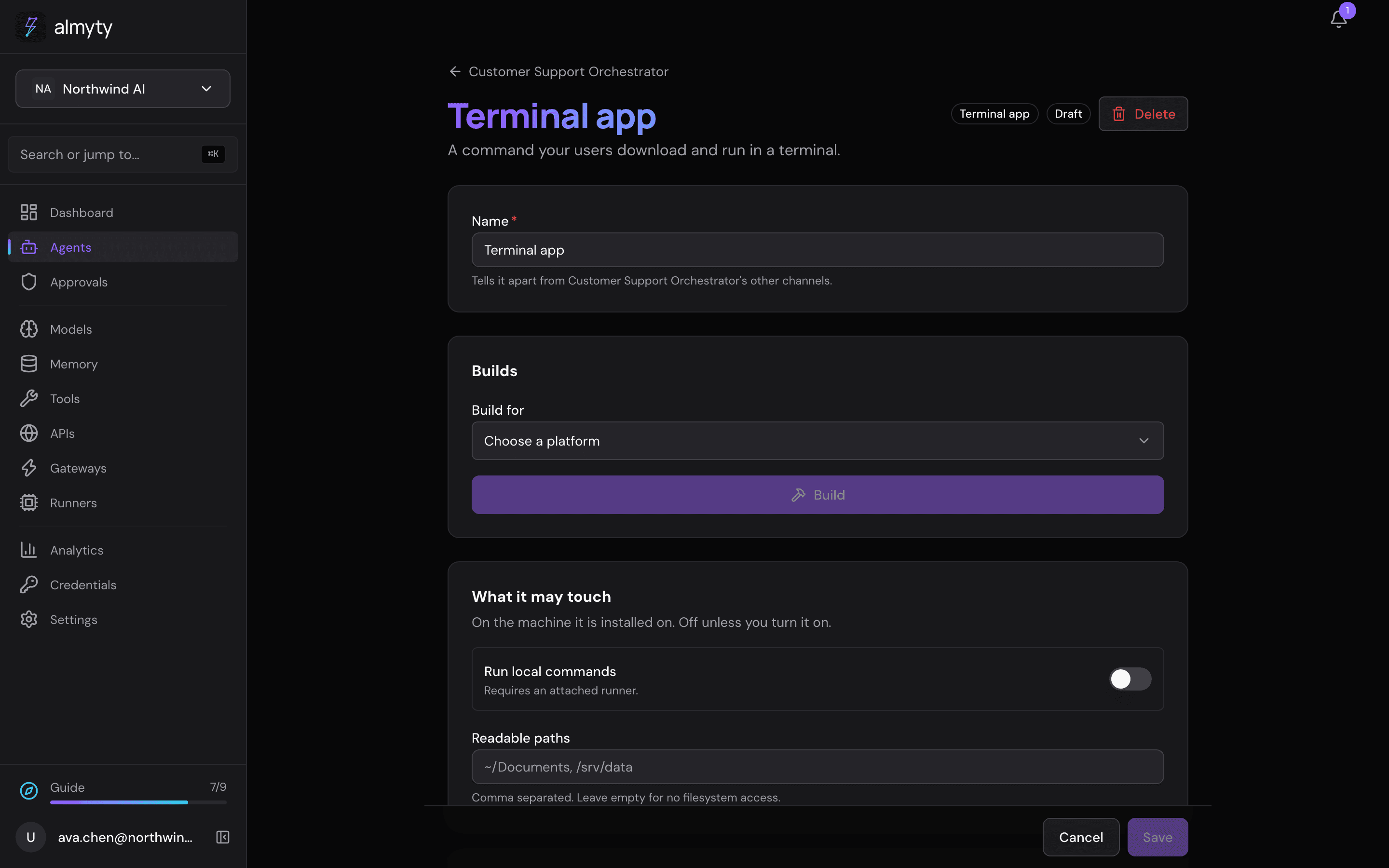
- On the assistant’s Channels tab, click Add channel and pick Desktop app or Terminal app.
- On the channel’s page, pick the platform under Build for.
- Under Sign with, pick a code-signing certificate, or leave it empty for an unsigned app (see Signing for why signing matters).
- Click Build. The page keeps a history of builds and the download link for each.
Anything that can be checked before building (an unknown platform, a missing build tool) is checked right away, so you find out at once instead of halfway through a build.
What you get on each platform
| Channel | Produces | Linux | Windows | macOS |
|---|---|---|---|---|
| Terminal app | a command-line app | a program file | .exe | a program file |
| Desktop app | an installable app | .AppImage | installer .exe | .app in a .zip |
Every platform can be built from any build machine. The one exception is a macOS .dmg disk image, which needs Apple’s own tools, so the desktop app ships as a zipped .app instead, which any Mac opens.
The desktop app
The desktop app is a window onto the assistant’s web chat, with your name on it. So the assistant needs a Web chat channel first, and the desktop channel’s page says which web chat it opens. The window only ever shows that web chat and refuses requests for extra access, and it is painted in your brand colour while it loads, so it never flashes white.
The icon
The desktop app wears your icon. Upload it once on the agent’s Channels tab, under Branding and visitor rules: click Upload icon next to App icon and pick a PNG, JPG or WebP, at least 512 pixels on each side and under 4 MB. A preview shows it, and Replace icon or Remove change it later. A channel can have an icon of its own under its own branding. The terminal app has no icon.
If there is no icon, the build uses a default one and tells you so; a missing icon never fails a build.
Download links
Each time someone asks for the download, a fresh link is made that works only for a short time, so a link pasted into a chat or a ticket stops working. The file itself is deleted some time after it is built. The downloaded file is named after the product, version and platform, so it is easy to spot in a Downloads folder.
When a build machine is missing something
Before you click Build, the page checks whether the build machine can make the app and, separately, whether it can sign it. These are two different problems with different fixes, so they are reported separately. Build is turned off when the machine cannot make the app, and shows a warning when it can make it but not sign it.
Ready to sign what you build? See Signing.
For developers
The icon is uploaded as a file: the browser turns the picked image into a 512-pixel square PNG, which goes to the files module, and the branding keeps its iconFileId (each save checks it is a PNG of this organization, no larger than 4 MB). A desktop build reads the icon from storage first and falls back to branding.iconUrl, which can still be set through PATCH /agents/:agentId/public-settings. The build makes each platform’s icon formats from it. Terminal builds carry no icon.
The desktop app is an Electron window with no Node in the page, navigation confined to the web chat’s own origin, and permission requests refused.
Builds over the API:
POST /agents/:agentId/channels/:channelId/builds                queue a build
GET  /agents/:agentId/channels/:channelId/builds                build history
GET  /agents/:agentId/channels/:channelId/builds/:id/download   a fresh download link
A self-hosted deployment that builds apps needs these tools on the build host:
| Tool | For |
|---|---|
bun | Terminal apps |
electron-builder (via npx) | Desktop apps |
rcodesign | signing and notarising macOS apps |
osslsigncode | signing Windows executables |
Desktop builds download a pinned framework release, so the host needs outbound network access at build time. The recommended layout keeps the API image lean and runs builds on a dedicated worker image; see the self-hosting notes for the trade-offs.